The agents you already use,inside your workspace.
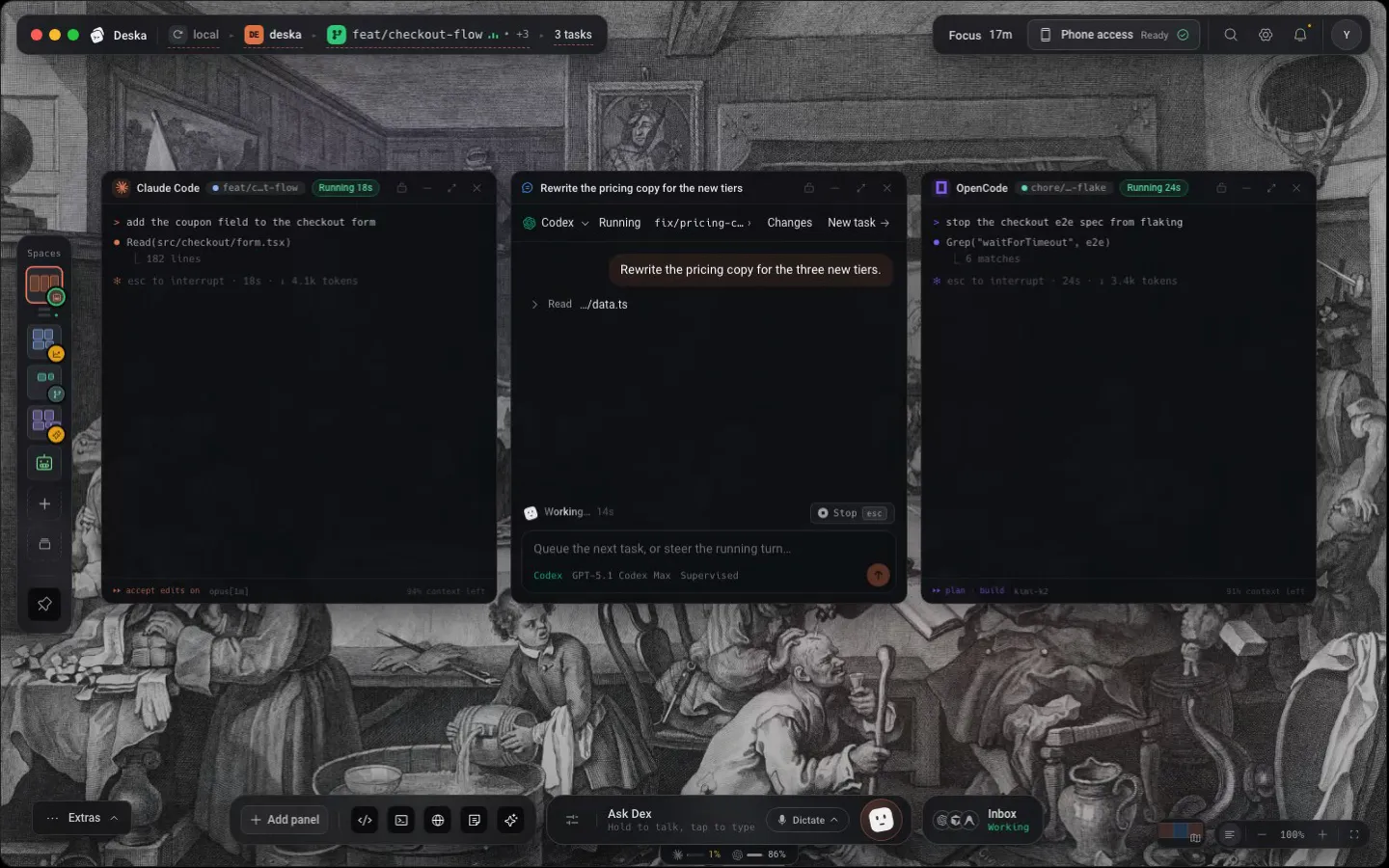
Claude Code, Codex, OpenCode, Cursor, Antigravity, Pi, Hermes, Mistral Vibe, and Kimi Code run beside the files they edit, on your machine and your own login. Drive them in a real terminal or hand them a task and read the thread: Deska keeps track of which one is waiting on you.
The agents that run as tasks
Choose the CLI you already use. Each one runs on your machine, opens as a terminal or as a thread, and keeps its own models and sign-in. Every other agent CLI runs in a terminal here, which the next section lays out in full.
- Claude Code
Anthropic's coding agent, with your whole project as context.
Anthropic CLIIts own sign-in
- Codex
The OpenAI CLI for explaining, debugging and refactoring.
OpenAI CLIIts own sign-in
- OpenCode
Open-source agent that runs on whichever provider you point it at.
Open source TUIBring your own provider
- Cursor
The Cursor agent from the command line, with the models and rules of the editor.
Cursor CLIIts own sign-in
- Antigravity
Google's coding agent, with streaming tasks, tool approvals and conversation resume.
Google agy CLIIts own sign-in
- Pi
A minimal coding agent that runs on the models and keys you already have.
Pi CLIOne account
- Hermes
Nous Research's agent, with its own tools and a conversation you can resume.
Nous Research CLIIts own account
- Mistral Vibe
Mistral's coding agent, with its hosted models and its own sign-in.
Mistral CLIIts own account
- Kimi Code
Moonshot's coding agent, signed in with a Kimi Code account.
Moonshot CLIOne account
Start a task or open a CLI from the Panel Library. Models and controls depend on the provider.
Run several copies of one agent, each with its own accountDex
The built-in assistant that drives the workspace itself, by voice or text. Runs on your own agent.
Meet DexThree ways to put an agent to work
Same agents, same machine: you pick how much of the CLI you want to see.
- As a terminal
- Open Claude Code, Codex, OpenCode, Cursor, Antigravity, Pi, Hermes, Mistral Vibe, and Kimi Code from the Panel Library as a Terminal and you get the CLI itself: its own TUI in a real shell, your config, its keybindings, beside the files it edits.
- As a thread
- Write the task instead and the same CLI runs behind a rendered transcript: tool calls, diffs and plan steps as rows you can read, permission prompts as buttons, and every run collected in one inbox. Dex can start one for you by voice.
- Left to run while you leave
- Start something long on a computer that stays online, then follow it from your phone with a paid plan. Notifications tell you when it finishes or needs an answer. Use Deska Cloud when your own laptop needs to close.
Nine agents all the way in. Every other one in a terminal.
Claude Code, Codex, OpenCode, Cursor, Antigravity, Pi, Hermes, Mistral Vibe, and Kimi Code run as tasks here, with a rendered transcript and the Inbox, permission requests as buttons wherever the agent asks, and the models each one lists in its picker. Every other agent CLI runs in a Deska terminal on the same canvas, in the same project, and Deska still tells you when it is working, when it wants you and when it is done.
As a task or as a terminal
The whole product
- Claude Code
- Codex
- OpenCode
- Cursor
- Antigravity
- Pi
- Hermes
- Mistral Vibe
- Kimi Code
Known by name in a terminal
Badge, status and notifications
- Gemini CLI
- Aider
- Muse Code
Anything else with a TTY
Runs the way it runs in your shell
- Goose
- Amp
- Copilot CLI
- Crush
- Qwen Code
| What you get | As a task | In a terminal |
|---|---|---|
| Runs on your machine, beside the files it edits | Included | Included |
| Your own subscription and your own sign in | Included | Included |
| On any computer you linked, or on a Cloud box | IncludedA Cloud box comes with Claude Code, Codex, OpenCode, Cursor, and Antigravity | Included |
| Deska sees it working, waiting for you or done | Included | Included |
| Notifications on the desk and on your phone | Included | Included |
| Open it from your phone and answer it there | Included | Included |
| A transcript with diffs, plan steps and subagents | IncludedPlan steps and subagents when the agent reports them | Its own TUI |
| Permission requests as buttons | Included never asks | Its own menu |
| Models picked in Deska | Included lists none yet and runs on its own default | Its own flags |
| Several accounts of one agent | IncludedOne for now on | Its own config |
| Tasks, a git worktree each, and the Inbox | Included | No |
A Deska terminal is a real shell, so an agent that is not on this page runs there too. Gemini CLI, Aider, and Muse Code are recognized by name, which is what the badge and the status read from. How agents run in Deska
Hand off a task. Stay in the loop.
Every task reports to the Inbox, sorted by what it wants from you: Needs you, Working, Landed. Follow progress, review changes and answer permission requests from that one place. Threads can keep running while you step away.
- Runs on your machine
- Reply from your phone on a paid plan
Installed for you
The Panel Library checks whether each CLI is on your machine and offers to install it. Each agent’s card then opens it as a supervised task or in its own terminal, whichever you pick.
Sessions survive a restart
Quit Deska mid-task and the conversation picks the thread back up when you reopen the project. Every agent's tasks do, and in a terminal so do Claude Code, Codex, OpenCode, Cursor, Antigravity, Pi, and Gemini CLI.
Your CLI login, your plan
Drive the coding agent you already installed, on your own CLI login and the subscription you already pay for. Deska never meters it.
Worth knowing
- Launch an agent
- Panel Library (Cmd/Ctrl + Shift + E)
- Runs as
- A real terminal, or a supervised thread
- Sign-in
- Each CLI handles its own
- Coding agents
- Yours, on your machine, never metered
About the agents
One canvas for everything you build.Free to start.
The complete workspace on one computer, with 10 dictation minutes a month.